Get your booking link
How to Retrieve the LIFF URL for Your Booking System
The LINE Developers console provides a dedicated “LIFF” tab for each channel. From this tab you can copy the permanent link that customers will use to access your booking interface.
- Log into the LINE Developers Console
- Open
developers.line.bizand sign in with your LINE account.
- Open
- Select the Correct Provider
- In the “Providers” list, click the provider you created earlier. This is where all of your channels are grouped.
-
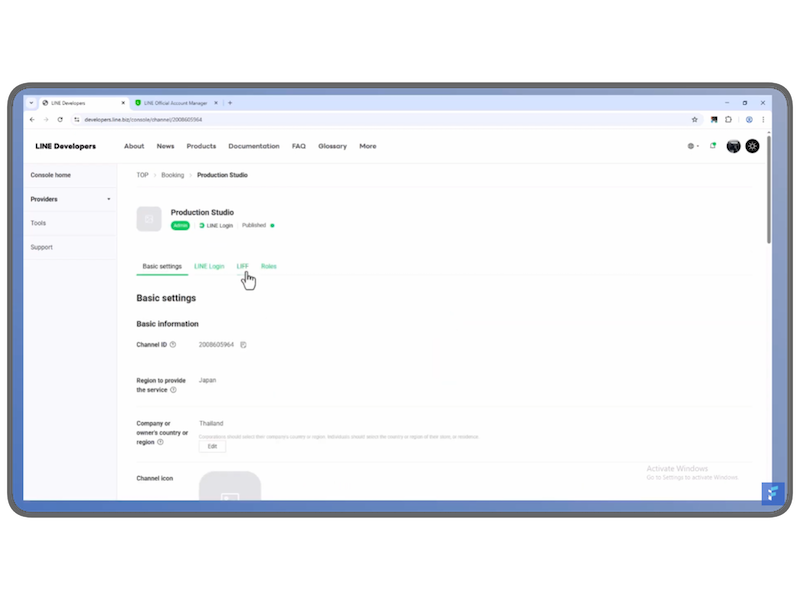
Choose the Relevant Channel
- Within that provider, locate and click the channel that hosts your booking system (usually only one channel is present).
-
Open the LIFF Tab
- On the channel’s page, click the LIFF tab. This section lists all LIFF applications associated with the channel.
-
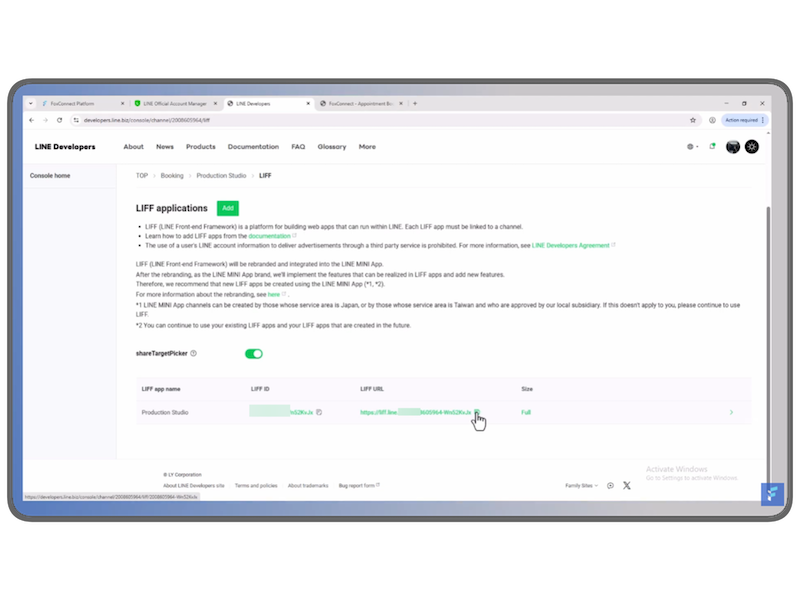
Copy the LIFF URL
- Scroll to the entry that corresponds to your booking app.
- Copy the LIFF URL displayed; this is a permanent link that can be shared with customers.
-
Share the Link
- Distribute this URL via email, website, or any other communication channel. When a customer clicks it, they will be taken directly into the booking system within the LINE app or an external browser.
The LIFF URL defaults to a Universal Link, enabling it to open both inside the LINE app and in external browsers. This makes it straightforward for users to start a booking session from wherever they are.
Key Points
- The LIFF URL is unique to the channel and the specific LIFF app you created.
- It can be accessed from the LIFF tab in the LINE Developers console under your selected channel.
- Sharing this link provides a seamless entry point for customers to use the booking system.
Feel free to paste the copied URL into your Fox Connect channel settings under “Line LIFF Booking” so that customers can start booking directly from the link.
Customers without a LINE account can book too. See Booking Without LINE to set up your public web booking link.